What Is OCR in Newspaper Archives?
Learn what OCR means in newspaper archives, why old newspaper searches miss names, and how to work around OCR errors in family history research.
OCR, or Optical Character Recognition, is the technology that turns scanned newspaper images into searchable text. In newspaper archives, OCR makes it possible to search old newspapers by name, keyword, place, date, or phrase. OCR works best when newspaper text is clear, dark, straight, and easy to read, but it can make mistakes when pages are blurry, faded, crowded, damaged, printed in old typefaces, or arranged in narrow columns. A failed newspaper search does not always mean the article is missing. The name may have been misread by OCR or printed in a way the search does not recognize. To work around OCR problems, researchers should try spelling variations, relatives’ names, places, event keywords, wider date ranges, nearby towns, and page browsing in NewspaperArchive or other historical newspaper archives.
Old newspapers look searchable.
You type in a name. You add a place. Maybe a year. Then you wait for the article to appear.
But behind that search box is something doing a lot of work: OCR.
OCR is the reason you can search old newspaper pages by name, keyword, place, or phrase. It is also one of the reasons a search can miss something that is clearly sitting on the page.
That part can be frustrating.
You may be looking right at the name in a clipping, but the search engine may not “see” it the same way you do.
That is why understanding OCR matters.
Not in a technical, computer-science way. You do not need that.
You just need to understand enough to know why a newspaper search works beautifully one minute and completely fails the next.
Quick answer: what is OCR in newspaper archives?
OCR stands for Optical Character Recognition. In newspaper archives, OCR is the technology that turns scanned newspaper images into searchable text. It allows users to search old newspapers by name, keyword, location, date, or phrase. OCR works best when the newspaper page is clear and the text is sharp. It can make mistakes when pages are blurry, faded, crowded, damaged, printed in old typefaces, or arranged in narrow columns.
What OCR actually does
When a historical newspaper is digitized, the page usually starts as an image.
A scanned page is something you can look at, but a computer cannot automatically understand the words on it. OCR helps bridge that gap.
It tries to “read” the letters on the newspaper page and turn them into searchable text.
That searchable text is what allows you to type:
Frank McDonald
Peraelda Brown
Hamilton cemetery
funeral notice
runaway horse
Bessie Melton
and get results from old newspapers.
So when you search NewspaperArchive, you are not only searching the image you see on the screen. You are searching the text that OCR created from that image.
That is very helpful.
But it is not perfect.
If you have ever searched NewspaperArchive for a name you were sure should be there, and nothing came up, this is worth understanding. Before you give up on that search, try looking at it through the lens of OCR. The article may be there, even if the search engine did not read the name the way you typed it.
A clean clipping is easier for OCR to read
This “Frank McDonald Dead” clipping is a good example of the kind of text OCR usually handles better.
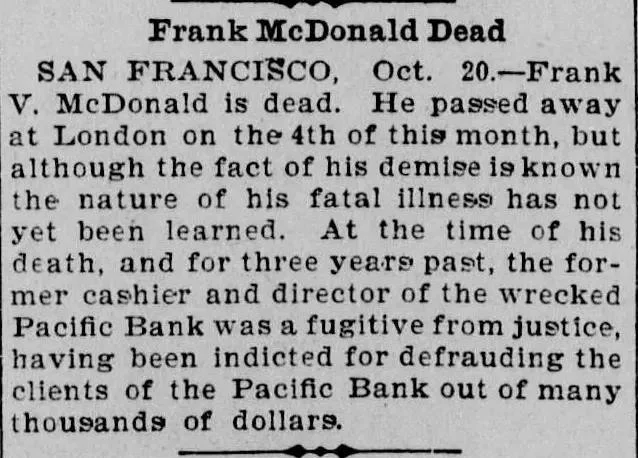
The letters are fairly dark.
The lines are straight.
The article is separated clearly from the surrounding text.
The name is easy to see.
That does not mean OCR will read it perfectly every time, but it has a much better chance.
This is the kind of clipping where a name search is more likely to work.
If you searched:
Frank McDonald
Frank V. McDonald
Pacific Bank
London
San Francisco
there is a reasonable chance the article would appear because the text is readable and the layout is fairly simple.
But not every newspaper page looks like this.
Why OCR makes mistakes
OCR struggles when the newspaper itself is hard to read.
That might happen because:
the print is faded
the page is blurry
the ink is uneven
the letters are broken
the page is stained
the scan is dark
the text is crooked
the paper is wrinkled
the columns are crowded
the typeface is old or unusual
A human reader can often figure out a word from context.
OCR does not always do that well.
That is why a name may be visible to you but still not show up in search.
A name can be readable to you and still hard for OCR
This Peraelda Brown clipping is a great example.
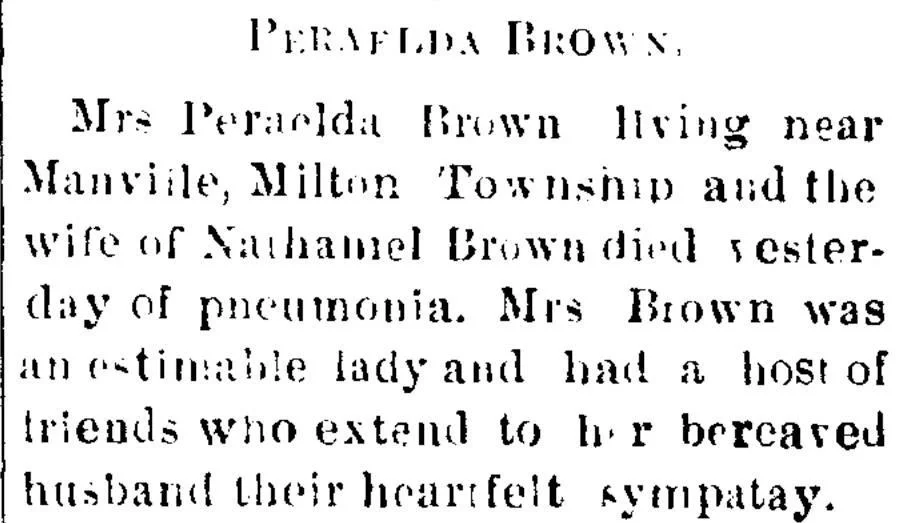
You can look at it and understand that it is about Mrs. Peraelda Brown, wife of Nathaniel Brown.
But the letters are not perfectly clean. Some of the text is uneven. Parts of the name could easily be misread.
A person can slow down and think:
“That must be Peraelda Brown.”
OCR may see something else entirely.
It might confuse letters.
It might skip part of the name.
It might read the spacing oddly.
It might turn a letter into a different letter.
This is why name searches can be so tricky in old newspapers.
If Peraelda Brown does not show up, I would not assume the article is missing. I would try searching around the problem.
Try:
Brown + Nathaniel
Nathaniel Brown + Manville
Brown + pneumonia
Brown + Milton Township
Brown + wife
Peraelda + Brown
Peraelda with spelling variations
Sometimes the name is the weakest search term, even when the article is about that person.
OCR has to read the whole page, not just your ancestor’s name
This is easy to forget.
When you search a newspaper archive, OCR is not reading one neat clipping at a time. It often has to process an entire page.
That page may include:
long columns
tiny print
advertisements
article fragments
tables
lists
headlines
damaged edges
mixed font sizes
notices squeezed together
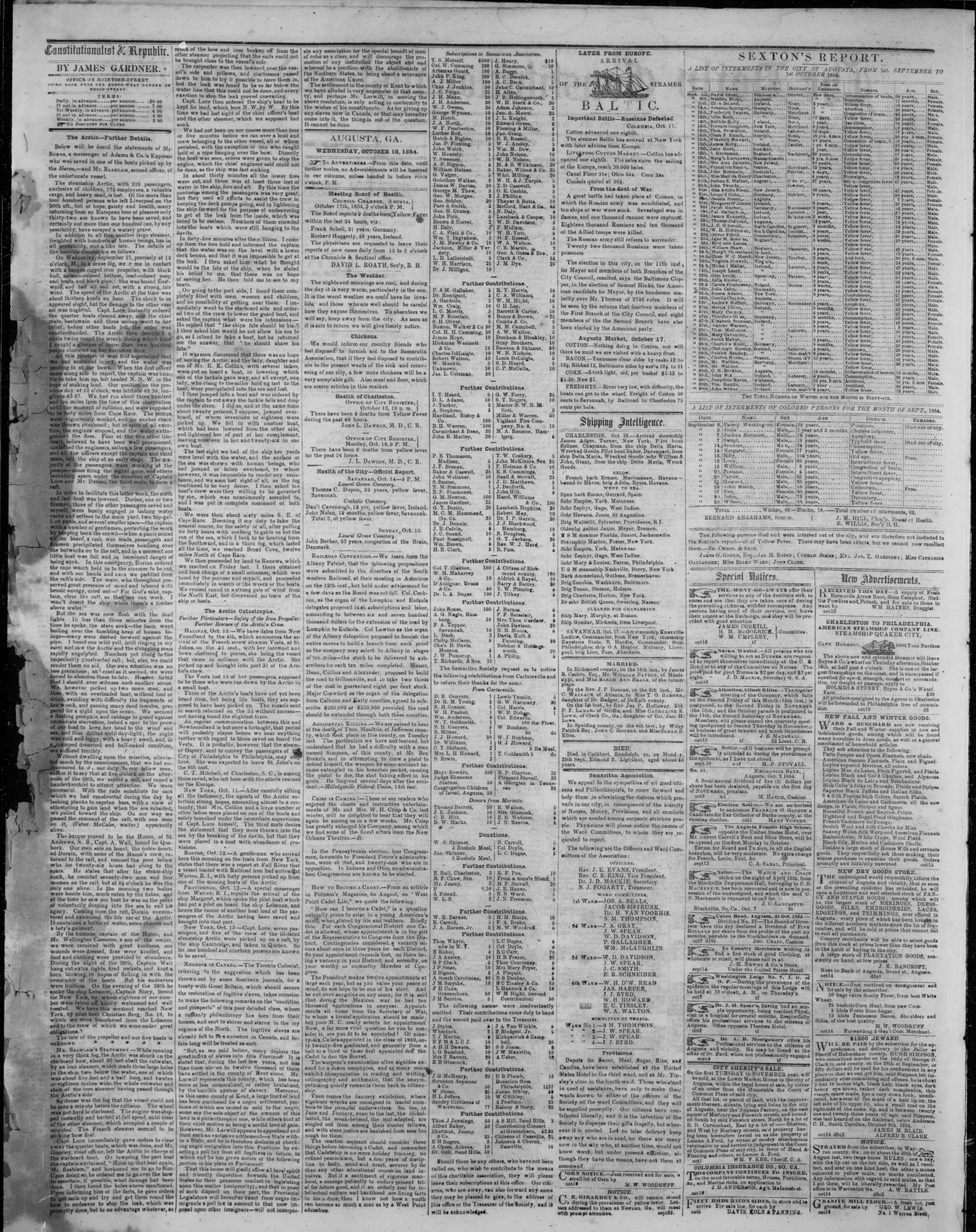
The full-page clipping shows exactly why this matters.
There is a lot happening on one page.
A human eye can zoom in, scan headings, skip ads, and notice a name in a small column. OCR has to interpret all of it as text.
That is not easy.
So if your ancestor’s name appears in a tiny notice on a crowded page, the search may miss it.
This is why browsing still matters.
Search is wonderful when it works, but sometimes you need to open the page and look for yourself.
Older newspapers can be even harder
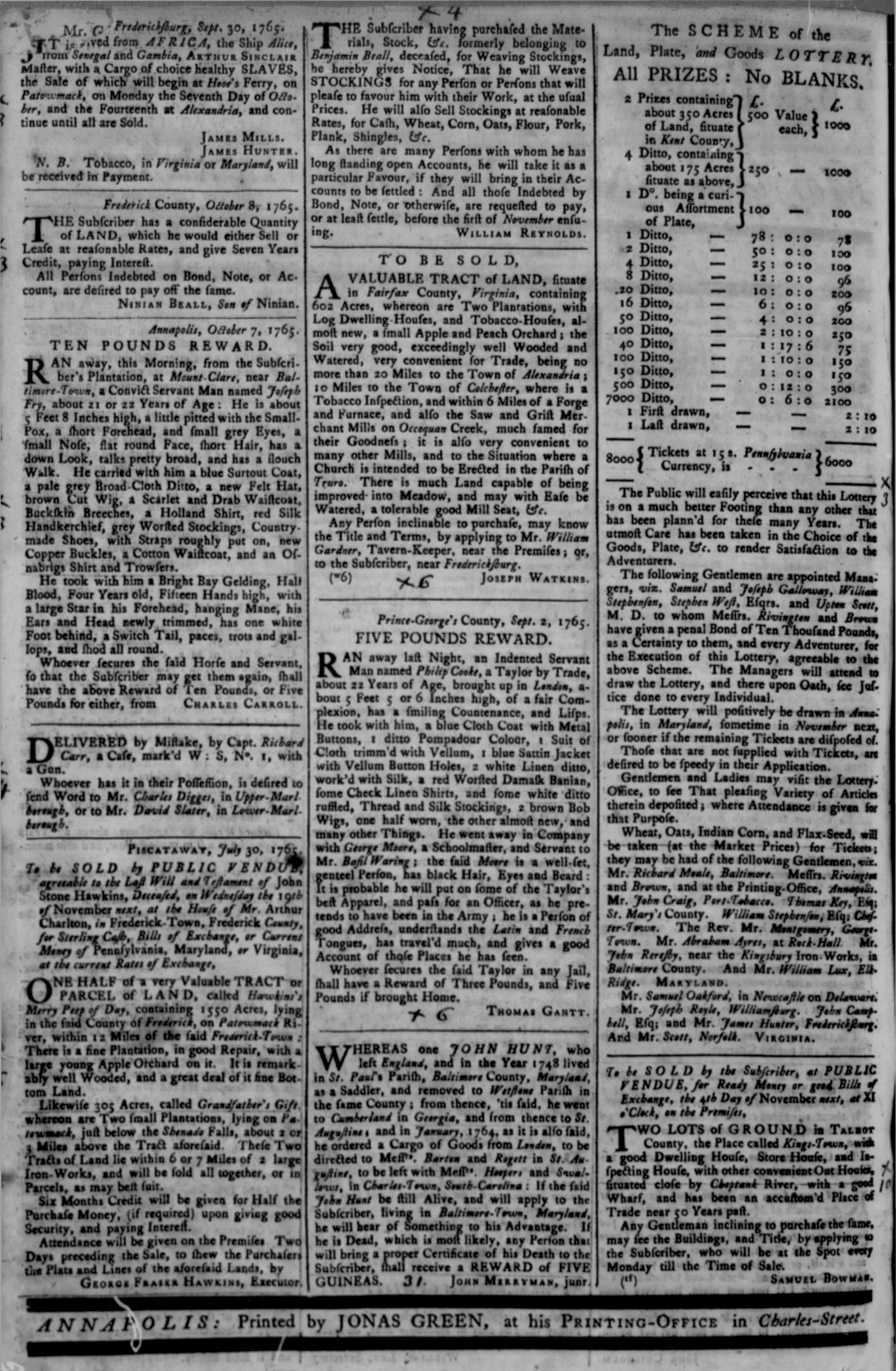
Very old newspapers bring their own problems.
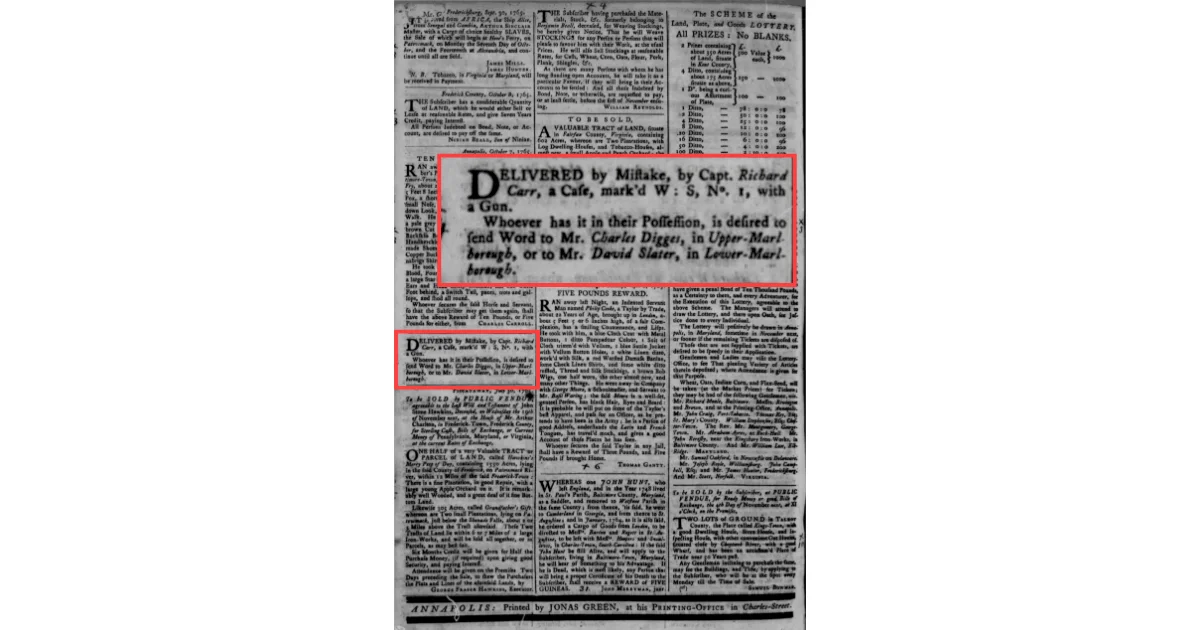
The 1765 Maryland Gazette page is a strong example. It has dense columns, old type, uneven print, long passages, advertisements, notices, and letterforms that look different from modern text.
Older newspapers may include:
unusual fonts
long s-style letterforms
inconsistent spelling
crowded columns
damaged paper
uneven ink
words split across lines
unfamiliar abbreviations
A modern reader may need a minute to adjust.
OCR has to adjust too, and it does not always succeed.
This is one reason early newspapers can be difficult to search by exact name. The article may be there, but the searchable text may not match what you typed.
Why your ancestor may not show up in search
If your ancestor does not appear in a newspaper search, there are several possibilities.
It may be that:
the article is not in that archive
the name was spelled differently
the newspaper used initials
the person was listed under a spouse’s name
the page was not digitized clearly
OCR misread the name
the article was too small or crowded
the notice was under an unexpected heading
the date or place you searched was too narrow
OCR is only one piece of the puzzle, but it is a big one.
This is why I try not to treat “no results” as the final answer.
Sometimes “no results” really means:
Try another spelling.
Try a relative.
Try a place.
Try a keyword.
Try browsing.
How to work around OCR problems
When OCR gets in the way, change the search.
Do not keep typing the exact same thing.
Try fewer words
If a full name does not work, try the surname and location.
Instead of:
Mrs. Peraelda Brown Milton Township pneumonia
Try:
Brown + Manville
Brown + Nathaniel
Brown + pneumonia
Try relatives
If the person’s name is hard to read, another name in the article may be clearer.
Search:
spouse
parent
child
sibling
neighbor
employer
minister
funeral home
For the Peraelda Brown clipping, Nathaniel Brown may be easier to search than Peraelda.
Try places
Places can rescue a bad name search.
Search:
town
township
county
cemetery
church
hospital
street address
Try keywords from the article
If you know the event, search the event.
Try:
pneumonia
funeral
accident
injury
runaway
marriage
anniversary
court
estate
Try spelling variations
Names may be misspelled in the newspaper or misread by OCR.
Try:
Brown / Browne
Siebert / Seibert / Sibert
Haunert / Hawnert / Hounert
Richey / Ritchey / Richie
McDonald / MacDonald
Browse the paper
If you know the place and date, browsing may be the better choice.
Open the newspaper around the date and scan the pages yourself.
That is often how you find the notice the search missed.
Why browsing still matters
I love search. I use search constantly.
But I do not trust search to catch everything.
If I know an event happened in a certain place and time, I will often browse the paper even if the search does not find it.
Browsing helps when:
the name is faded
the OCR is messy
the article is tiny
the page is crowded
the person is listed under initials
the newspaper used a heading you did not search
the article is near another related item
This is especially true for obituaries, funeral notices, local columns, marriage announcements, accident reports, and small-town news.
Sometimes the article is there.
It is just not searchable in the way you hoped.
What OCR means for family history research
OCR changed newspaper research in a huge way.
Without it, we would have to browse every page by hand.
With OCR, we can search names, places, and keywords across thousands of newspaper pages in seconds.
That is incredible.
But OCR also means we have to be careful.
A search result is not the same thing as the full archive. It is the part of the archive the OCR and search system were able to connect to your search terms.
That is why good newspaper research uses both:
searching
browsing
Search first. Adjust the terms. Try variations. Then browse when the search does not feel complete.
How NewspaperArchive helps with OCR searching
NewspaperArchive lets you search historical newspapers by name, place, date, and keyword. That makes it much easier to find people across old newspaper pages, especially in local and small-town newspapers.
But like every newspaper archive, it is working with old pages, old print, and OCR text.
That means search is powerful, but it is not magic.
The best approach is to use NewspaperArchive search as a starting point, then adjust your terms when the first search does not work.
If you have searched a name before and nothing came up, try it again with one small change. Use a spouse, a town, a cemetery, an occupation, or a keyword from the event. You may be searching for the right person with the wrong OCR-friendly term.
OCR search checklist for old newspapers
When search is not working, try this:
Search the surname only
Add a town or county
Remove the first name
Try initials
Try a spouse’s name
Try children or siblings
Try spelling variations
Try a church or cemetery
Try an address or employer
Try event keywords
Widen the date range
Search nearby towns
Browse the newspaper page by page
Do not assume the article is missing just because one search failed.
FAQs About OCR in Newspaper Archives
What does OCR stand for?
OCR stands for Optical Character Recognition. It is the technology that turns scanned images of newspaper pages into searchable text.
Why does OCR matter in newspaper archives?
OCR makes it possible to search old newspapers by name, keyword, place, date, or phrase. Without OCR, researchers would need to browse newspaper pages manually.
Why does OCR miss names in old newspapers?
OCR can miss names when the page is blurry, faded, crooked, damaged, crowded, or printed in old type. It can also struggle with unusual fonts, broken letters, initials, and names split across lines.
Does a failed search mean the article is not there?
No. A failed search may mean the article is missing, but it may also mean OCR did not read the name correctly. Try spelling variations, relatives, places, keywords, and browsing.
How can I search better when OCR is wrong?
Use fewer words, search relatives, try places, search event keywords, test spelling variations, widen the date range, and browse the newspaper manually when needed.
Final thoughts
OCR is one of the reasons newspaper archives are so useful.
It lets us search old pages in a way our ancestors never could have imagined.
But OCR is also the reason we have to stay flexible.
A name can be on the page and still not appear in search. A notice can be readable to you and confusing to the computer. A full newspaper page can hold the clue you need, even when the search box does not find it.
So when a search fails, do not stop too soon.
Try the name another way.
Search the spouse.
Use the town.
Browse the page.
Look for the clue with your own eyes.
That is often where the missed newspaper find finally appears.
Key takeaways
OCR stands for Optical Character Recognition.
OCR turns scanned newspaper images into searchable text.
Clear, dark, well-spaced text is easier for OCR to read.
Blurry, faded, crowded, or old-style print can cause OCR mistakes.
A name may be visible on the page but still not show up in search.
Search results are helpful, but they are not perfect.
Use spelling variations, relatives, places, and keywords when search fails.
Browse newspaper pages when OCR may have missed the article.
Try revisiting one NewspaperArchive search that came up empty. Search the surname with a town, try a spouse or relative, or browse the newspaper around the date. Sometimes the best find appears after you stop asking the search box to do all the work.