The Best Way to Find Up to 20% More Pertinent Newspaper Articles Online
Learn how OCR errors in digitized newspapers hide results and how deliberately swapping lookalike letters in your search terms can uncover up to 20% more articles.
This guest post by Kenneth R. Marks of The Ancestor Hunt explains why online newspaper searches frequently miss relevant results, and offers a practical technique to recover them. The core issue is OCR (optical character recognition) accuracy: digitized newspapers are indexed by software that interprets scanned images pixel by pixel, and the quality of that process is affected by the condition of the original newsprint, whether the scan was made from the original paper or a degraded microfilm copy, the OCR software itself, and even errors made by the original typesetter or author. The result is an imperfect index that may not match what a researcher types into a search box. Marks illustrates this with a real OCR output sample showing garbled text from an 1890s newspaper. His solution is to deliberately misspell search terms by substituting visually similar letters that OCR software commonly confuses — for example, "h" and "b," "rn" and "m," "c" and "e," or "0" and "O." He provides a reference list of roughly twenty such lookalike letter pairs and combinations. Using this technique on his own ancestor's surname ("Braunhart" vs. "Braunbart") yielded a meaningful increase in results, and he estimates researchers can uncover up to 20% more pertinent articles by applying it systematically.
Most online newspaper researchers do not recognize that when searching for a word, a term, a name, etc. that they essentially are searching against a database that has been built based on whether a very small section of a newspaper is black or white. It is the formation of these dots that may look like a letter, a collection of letters, or a word.
Recognizing this fact and understanding that they are often dealing with very poor-quality source material (i.e., old newsprint) should encourage one to figure out a way to craft a winning search criterion.
Other than making sure that you are searching in the right place geographically and using a date range that fits your target search of an event or person, what follows is the best way to find more pertinent articles when searching online historical newspapers.
If you do newspaper research online as part of your genealogy pursuits or your search of history, then you have certainly been puzzled by some of the search results (or lack thereof) that you have received.
The creation of newspaper images and the application of the OCR process does not always result in what you might expect in the index, which is used to match against your search criteria.
Why Newspaper Search Results Are Often Incomplete
There is a simple explanation for this, and it all has to do with quality:
Quality of the original material – Was the newspaper old and brittle when scanned? Was it yellowed? Ripped or torn? Creased? Did it have dirt on it or lots of ink spots?
Was the scan performed that created the digital image from the original paper or from a microfilm of the paper, or worse, a copy of the microfilm? Every additional copy or scan degrades the resulting image, and when the OCR process is applied, the index suffers.
Quality of the OCR software – Some are more accurate than others.
Quality of the writing in the original newspaper – Did the author get your ancestor’s name or other pertinent words spelled correctly?
Quality of the typesetter – Did the typesetter get every word from the author set up correctly?
Thus, what you are searching for probably won’t be a perfect digital database that represents what was originally written by the author and newspaper publisher. Before we start solving our problem, let’s look at a typical 130-year-old piece of scanned newsprint and what the text looks like after the OCR process has been executed.

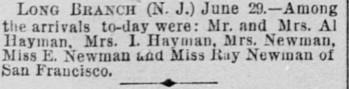
Here is the text after application of the OCR process:
Sun Fra-cisejrs at L->np Branch.
Long BKAHCB (N. J.) June 29.— Among tlie arrivals to-day were: Mr. and Mrs. Al Dayman. Mrs. 1. Ilayman, .Mrs. Newman, Miss K. Newman auU iftai Baf Newman of fcan Fraucisco.
As you can see, the text that was “determined” after applying the OCR process is less than optimal. And this is mild compared to some of the results obtained from a very poor-quality newspaper page. The moral of this story is that to be successful, you must anticipate that the OCR process might catch a certain letter as another letter.
Here is a magnified example of a lowercase “b” and a lowercase “h”:
b h
Look at them closely. The only difference is pretty much at the bottom, where an inadvertent drop of ink in the middle of the opening at the bottom of the “h” turns it into a “b.”
It is also coincidentally true for the capitalized versions of these two letters:
B H
Again, the inclusion or absence of ink dots “changes” the letter. I discovered this many years ago when I was looking for an ancestor in a set of California online newspapers. His surname was “Braunhart,” so I changed the search criteria to Braunbart, substituting a lowercase b for a lowercase h in the middle of the string. Lo and behold, I found a significant percentage of additional results. After playing around with other letter “pairs” or “combinations,” I am confident in telling you that you can increase your results by as much as 20% using this simple technique.
Common Letter Pairs and Combinations to Try
So, what letter pairs or combinations should we adopt in our search criteria? There are many of them, but here are twenty or so to get you started:
rn and m (ar n and em)
m and n
h and b
h and n
Capital D and O
i, l, 1, /, !, and I are all often interchanged
0 and O
c and e and o
G and O
B and 8
R and K
r and n
[, ] and l (el)
nl and m (en el and em)
R and B
n and ri (en and ar eye)
v and y
S and 8
S and 5
Z and 2
G and 6
Y and V
My suggestion? Change your search criteria and exchange the letters in the string you enter in the search box to include these alternative letters and letter pairs and see what happens. In other words – deliberately misspell the name or word. You will be pleasantly surprised!
About the Author
Kenneth R. Marks is a passionate genealogist, author, and one of the leading voices in online newspaper research for family history. What began as casual curiosity in 2002 quickly grew into a lifelong pursuit of uncovering not just names and dates, but the full life stories of his ancestors. That passion inspired him to found The Ancestor Hunt in 2008, which has since grown into a comprehensive resource trusted by more than 100,000 family historians worldwide. Before turning his attention to genealogy, Kenneth spent 35 years in Information Technology, including executive roles with Boeing, Pearson, and NASA, a background that gives his research methodology a uniquely analytical edge. Today, The Ancestor Hunt offers an extensive library of free online genealogy collections, research guides, the renowned Newspaper Research Academy, and four published books. Whether you're just starting out or a seasoned researcher, his practical, hard-won expertise is sure to help you find the ancestors you've been looking for.