
Obituary Search Checklist: What to Try When Nothing Comes Up
Use this obituary search checklist to find old newspaper obituaries, death notices, funeral columns, local mentions, and hidden family clues.
When an obituary search comes up empty, the notice may still exist under a different heading, name, place, or article type. Researchers should search beyond the word “obituary” by trying death rolls, funeral notices, local columns, phrases like “called home,” married names, maiden names, relatives, cemeteries, churches, and nearby towns. A good obituary search checklist includes broad surname and location searches, funeral-related keywords, date-range expansion, page browsing, and saving every clue for a follow-up search in NewspaperArchive or another historical newspaper archive.
There is a certain kind of frustration that comes with looking for an obituary.
You know the person died.
You know there should be something.
You type in the name, add “obituary,” and still nothing.
But sometimes the problem is not that the obituary is missing.
Sometimes the problem is that the clue does not look like the thing you expected to find.
That is exactly why an obituary search checklist helps. It gives you another place to look, another word to try, and another way to recognize the clue when it appears.
The four newspaper examples in this article show why that matters. One is a death roll. One is a short local mention. One is a full obituary. One is a brief article about a wife’s death. Each one gives a different kind of clue.
And all of them count.
Quick answer: what should you do when an obituary search comes up empty?
When you cannot find an obituary online, try searching beyond the full name and the word “obituary.” Use last name plus location, spouse names, married names, funeral words, death notices, cemetery names, local columns, and nearby newspapers. If search results still do not work, browse the newspaper around the death date and look for death rolls, funeral notices, local mentions, and short articles connected to the death.
Start by asking: what kind of death notice am I actually looking for?
We tend to use the word “obituary” for everything.
But newspapers did not always use that word.
Sometimes obituary information appeared under headings like:
Death Roll
City Deaths
Funerals
Called Home
Is Called Home
Wife Died
Death Notices
Funeral Notices
Local News
Personals
That matters because if you only search for the word “obituary,” you may miss the record completely.
This clipping is a perfect example.
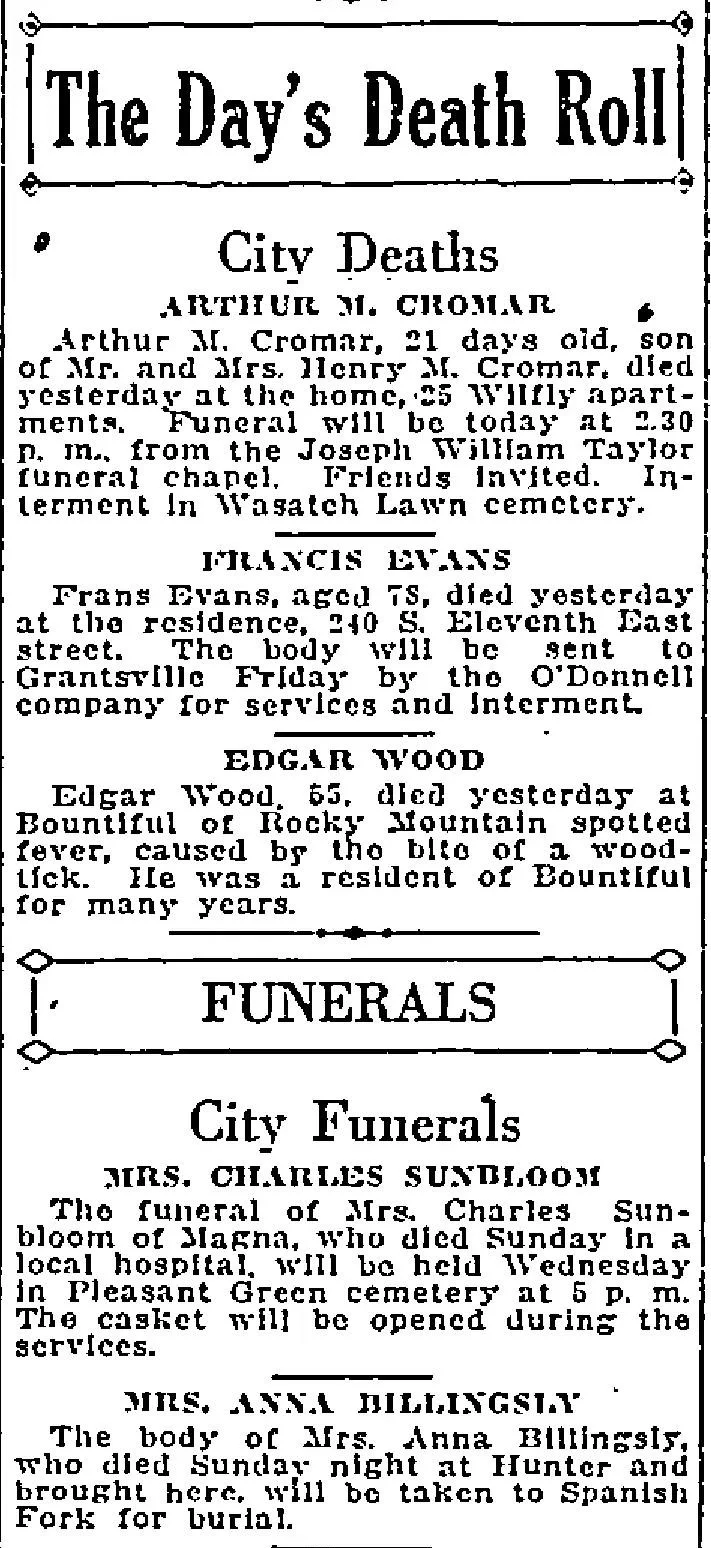
It includes several death and funeral notices in one place:
Arthur M. Cromar, 21 days old
Francis Evans, age 78
Edgar Wood, age 55
Mrs. Charles Sunbloom
Mrs. Anna Billingsly
This is not one long obituary. It is a grouped deaths and funerals column.
But look at what it gives you:
Names
Ages
Death locations
Funeral details
Cemetery names
Addresses
Funeral chapel names
Burial places
That is a lot of information from one column.
Checklist step: Search for death-related section headings, not just the word obituary.
Try words like:
death roll
deaths
city deaths
funerals
funeral notice
burial
interment
cemetery
services
Use funeral words instead of obituary
This is one of the biggest shifts in obituary searching.
The notice you need may never use the word “obituary.”
In “The Day’s Death Roll” clipping, the lower section is clearly labeled “Funerals.” If you were only searching obituary, you might miss it.
Funeral notices can be incredibly useful because they often include:
Service date
Time of service
Funeral home or chapel
Church
Cemetery
Burial location
Whether friends were invited
Whether the body was sent to another town
Try searching:
funeral
funerals
funeral services
services held
interment
burial
cemetery
chapel
friends invited
body will be sent
body will be taken
This is especially useful when the person did not receive a full obituary.
Sometimes the funeral notice is the only newspaper record you find.
Search for local mentions, not just formal notices
This is where a lot of people miss things.
Not every death-related clue appears in an obituary section. Sometimes it shows up as a short local item.
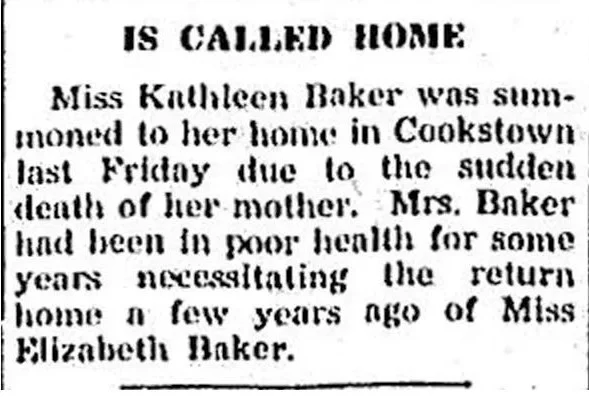
It says Miss Kathleen Baker was summoned home to Cookstown because of the sudden death of her mother. It also mentions that Mrs. Baker had been in poor health and that Miss Elizabeth Baker had returned home a few years earlier.
That is a tiny notice, but it gives you a lot:
Kathleen Baker was away from home
Her home was Cookstown
Her mother died suddenly
Mrs. Baker had been in poor health
Elizabeth Baker was likely another family member
The family had a connection to that town
If you were searching only for Mrs. Baker’s full obituary, you might not see this at all.
But this little piece could point you toward the right town, the right family, and the right timeframe.
Checklist step: Search for relatives and local movements connected to a death.
Try searches like:
last name + called home
last name + summoned home
last name + death of mother
last name + death of father
last name + attended funeral
last name + returned home
last name + poor health
Search for the people around the person who died
This is one of the most useful obituary search habits.
If the person you want is not showing up, search for the people connected to them.
In the “Is Called Home” example, the mother is the person who died, but the article names Kathleen Baker and Elizabeth Baker. Those names may be the better way into the search.
Try searching for:
Spouse
Parents
Children
Married daughters
Siblings
In-laws
Funeral attendees
People called home because of the death
Sometimes the article is not about the person who died. It is about the person who traveled, received the telegram, hosted relatives, or attended the funeral.
That still counts.
It may be the clue that helps you find the formal obituary later.
Do not ignore “Called Home” language
Older newspapers often used religious or softened language around death.
You may see phrases like:
called home
passed away
breathed her last
gone to rest
fallen asleep
departed this life
angel of death
laid to rest
These phrases can feel dramatic to modern readers, but they were common.
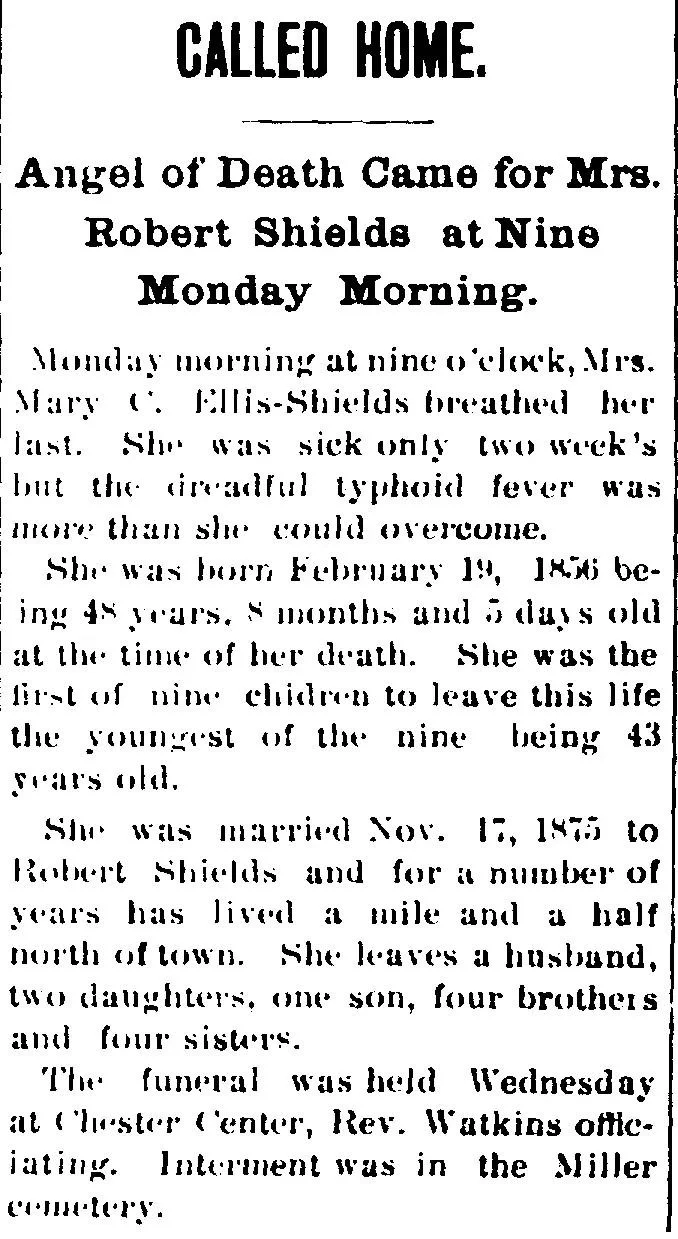
This article tells us:
She died Monday morning at nine o’clock
She had typhoid fever
She was born February 19, 1856
Her exact age at death was listed
She was the first of nine children to die
She married Robert Shields on November 17, 1875
She lived north of town
She left a husband, two daughters, one son, four brothers, and four sisters
The funeral was held at Chester Center
Interment was in Miller Cemetery
That is a lot of family history in one article.
But again, the headline is not simply “Obituary.” It is “Called Home.”
Checklist step: Search for older death phrases.
Try:
called home
passed away
breathed her last
departed this life
laid to rest
angel of death
fallen asleep
Search married women more than one way
The Mrs. Robert Shields clipping also shows another important search lesson.
The headline identifies her as Mrs. Robert Shields, but the article gives her name as Mary C. Ellis-Shields.
That means you could search several ways:
Mary Shields
Mary C. Shields
Mary Ellis
Mary Ellis-Shields
Mrs. Robert Shields
Robert Shields wife
Shields Chester Center
Shields Miller Cemetery
If you only searched Mary Shields, maybe you would find it.
Maybe not.
For women, especially married women, you almost always need more than one version of the name.
Search:
Given name
Married name
Maiden name
Husband’s name
Mrs. + husband’s full name
Mrs. + husband’s initials
Wife of + husband’s name
This is one of those steps that feels small until it finds the article.
Pay attention to illness, occupation, and life details
Obituaries and death-related articles do more than confirm death.
They can tell you how someone lived.
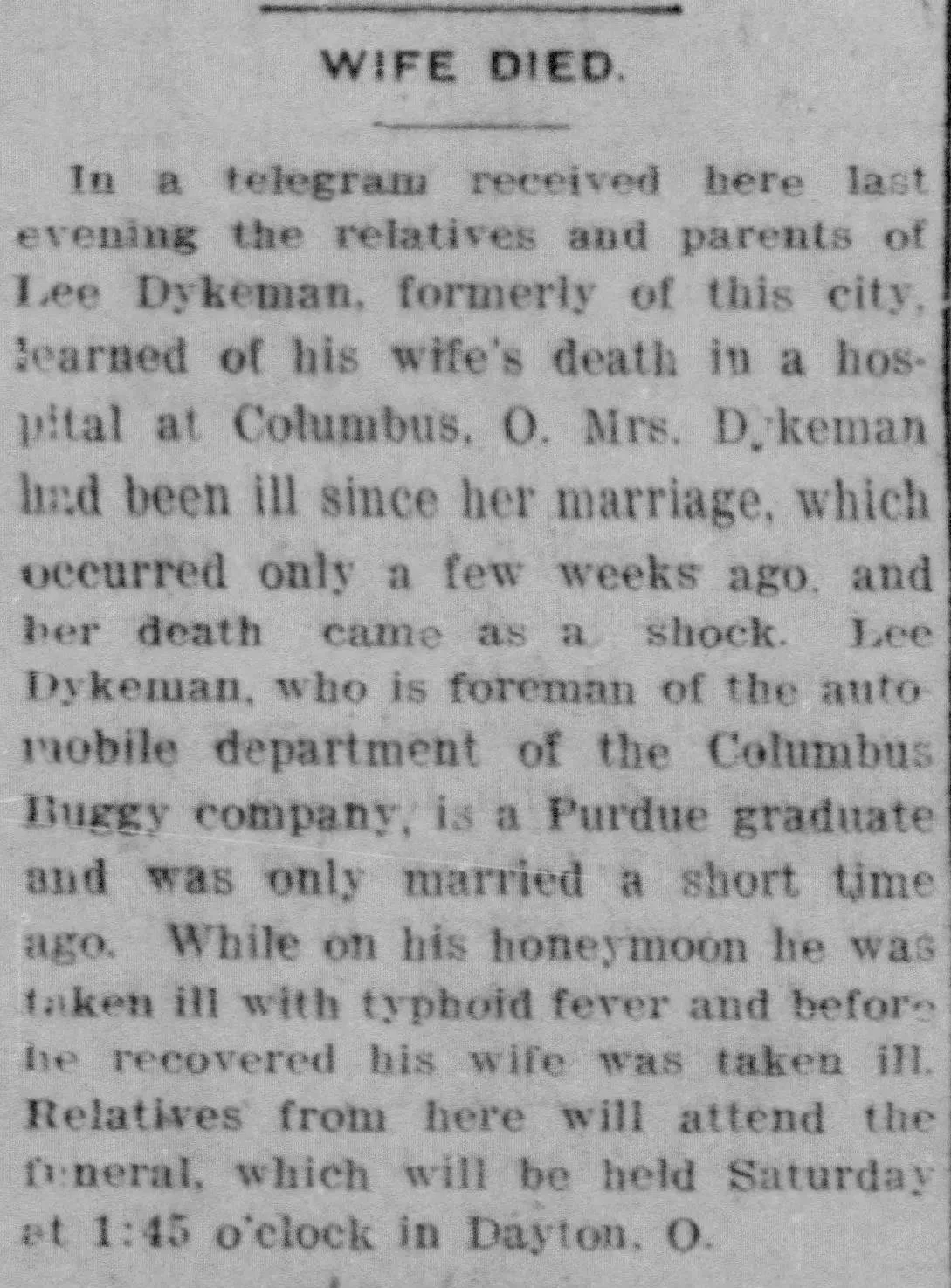
It says relatives and parents of Lee Dykeman learned by telegram that his wife died in a hospital at Columbus, Ohio. It adds that Mrs. Dykeman had been ill since her marriage only a few weeks earlier, and that her death came as a shock.
Then it gives more context:
Lee Dykeman was formerly of the city
He worked as foreman of the automobile department of the Columbus Buggy Company
He was a Purdue graduate
He had only been married a short time
He became ill with typhoid fever while on his honeymoon
Relatives from the area would attend the funeral in Dayton
This is not just a death notice.
It is a chain of clues.
You now have:
Columbus, Ohio
Dayton, Ohio
Purdue
Columbus Buggy Company
Lee Dykeman
His wife
Typhoid fever
A recent marriage
Funeral location
Any one of those could become the next search.
Checklist step: Pull out every searchable clue from the article.
Look for:
Employer
School
Illness
Hospital
Funeral city
Former residence
Relatives
Telegram mentions
Marriage timing
Travel details
Search more than one place
The “Wife Died” clipping is also a good reminder that death records and obituary mentions can appear in more than one place.
Mrs. Dykeman died in Columbus.
The funeral was in Dayton.
Lee Dykeman was formerly from another city.
His relatives lived somewhere else.
He had a connection to Purdue.
So where should you search?
All of those places.
Try:
Place of death
Place of burial
Place where the funeral was held
Former hometown
Town where relatives lived
Town where spouse worked
College town
Employer location
This matters because a person’s death may be reported where they died, where they lived, where they were buried, or where their family still lived.
If you only search one town, you may miss the notice.
Widen the date range
This is one of the easiest things to overlook.
Do not search only the exact date of death.
Search:
A few days after death
The day after the funeral
The week after the funeral
A few weeks later
One year later for memorial notices
Funeral notices may appear before the funeral. Obituaries may appear after. Local mentions may show up days later.
If you stop too soon, the paper may not have caught up yet.
Browse when search fails
At some point, typing another search is not the best use of your time.
That is when I would browse.
Go to:
The likely newspaper
The right week
The right town or nearby town
Then scan for headings like:
Death Roll
Deaths
Funerals
Local News
Personals
Society
Church Notes
County Correspondence
This is exactly why the “Day’s Death Roll” clipping is useful. A whole group of death and funeral notices may be sitting under one heading.
If OCR misses the name or the article is hard to read, browsing may be what finally gets you there.
Save every clue, even the small ones
Do not wait until you find the perfect obituary to save your work.
Save the little clues too.
From the four examples in this post, you might save:
Names
Ages
Addresses
Dates
Funeral chapel names
Cemetery names
Cause of death
Churches
Schools
Employers
Towns
Relatives
Former residences
Phrases used in the article
I would especially save the exact wording from the newspaper.
If the article says “called home,” search that phrase again.
If it says “body will be sent,” search that phrase again.
If it names a cemetery, search that cemetery.
The clue in one article often becomes the search term for the next one.
This is where I’d start
If you are stuck, start with the simplest version:
Last name
Place
Broad date range
Then work through the checklist.
Try funeral words.
Try family names.
Try old death phrases.
Try nearby towns.
Try browsing.
Do not throw every detail into the search box at once.
Add one clue at a time so you can see what actually helps.
Obituary search checklist
Use this when the obituary is not showing up.
Search fewer words
Try last name + town
Try last name + county
Search death roll, deaths, funerals, and funeral notices
Try older phrases like called home, passed away, and laid to rest
Try initials, nicknames, maiden names, and married names
Search women as Mrs. + husband’s name
Search spouses, children, parents, siblings, and in-laws
Search for funeral attendees or relatives called home
Use funeral words instead of obituary
Search cemetery, church, funeral home, or minister names
Search the place of death and the place of burial
Search former residences and nearby towns
Widen the date range
Browse the newspaper when search does not work
Save every useful clue
Search again using the clues you found
Common questions about obituary searches
Why does nothing come up when I search the full name?
The name may have been printed differently, abbreviated, misspelled, or listed under a spouse’s name. The notice may also be in a death roll, funeral column, or local news item instead of a formal obituary.
Should I search for “obituary” or “death notice”?
Search both, but do not stop there. Try “funeral,” “burial,” “interment,” “called home,” “passed away,” “death roll,” and “funerals.” Many useful notices were not labeled as obituaries.
What if I only find a short funeral notice?
Keep it. A short notice can still give you a service time, church, cemetery, funeral home, address, or relative. Use those details to search again.
How far after death should I search?
Start with the week after death, then keep going if needed. Funeral notices, local mentions, and memorial items may appear days or weeks later.
What if the person died in one place but lived somewhere else?
Search both places. Also search the burial location, former hometown, and towns where close family lived. Death-related notices often appeared in more than one newspaper.
Final thought
When an obituary search comes up empty, it does not always mean there is nothing to find.
It may mean the notice is under a different heading.
It may name a relative instead of the person who died.
It may use a phrase like “called home.”
It may be a funeral notice instead of an obituary.
It may be sitting in another town’s paper.
That is why this checklist works.
It gives you something else to try before you give up.
Key takeaways
Obituary information may appear under many headings, not just “Obituary.”
Death rolls and funeral columns can hold several useful notices in one place.
Local mentions can point to deaths indirectly through relatives and travel.
Older phrases like “called home” can lead to strong obituary results.
Married women may appear under their husband’s name, maiden name, or both.
Short death-related articles can include employers, schools, illnesses, hospitals, and funeral locations.
Search more than one place if the person died, lived, worked, or was buried in different towns.
Browse the newspaper when search results are not enough.
Save every clue and use it to search again.
If you have an obituary search that keeps coming up empty, try it again with one small change. Use a different heading, a different place, or a different person connected to the family. A broader NewspaperArchive search can help you spot the kind of notice you might not have known to look for the first time.