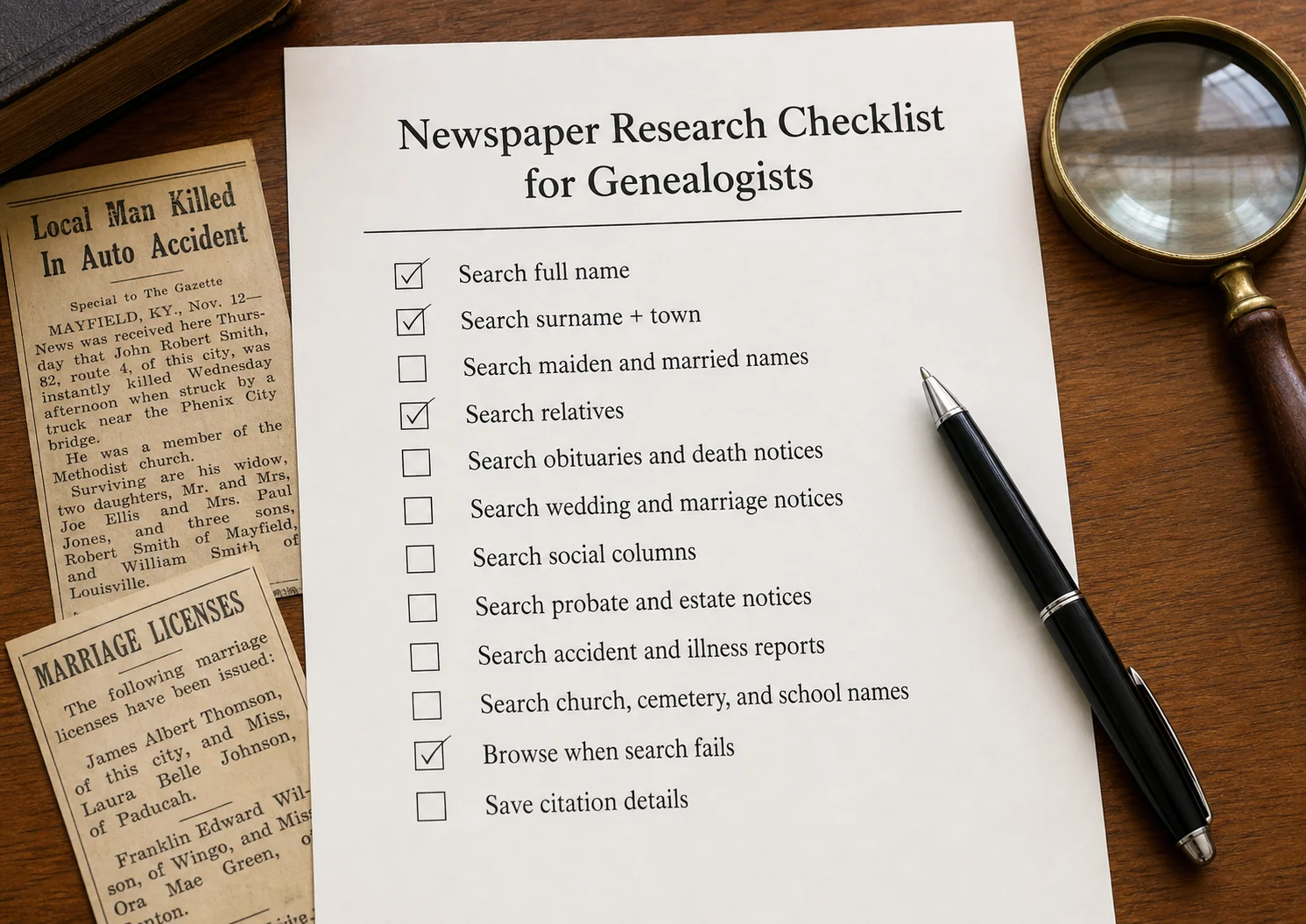
Newspaper Research Checklist for Genealogists
Use this newspaper research checklist for genealogy to find obituaries, weddings, probate notices, social columns, accidents, and family clues.
A newspaper research checklist helps genealogists search beyond obituaries and full names. Useful newspaper records for family history include obituaries, death notices, funeral notices, marriage and wedding announcements, anniversary articles, birth notices, social columns, probate notices, estate notices, accident reports, military mentions, church news, school items, occupations, advertisements, and local columns. Genealogists should search name variations, maiden and married names, initials, relatives, nearby towns, cemeteries, churches, employers, schools, and broader date ranges. They should also browse newspapers when OCR or search results fail, log both successful and failed searches, and save full citation details including newspaper title, publication place, date, page number, article title, archive name, and URL or clipping link.
Newspapers can do something formal records often can’t.
They can show the in-between parts of a life.
A census record may tell you where someone lived every ten years. A death certificate may give a date and place. A marriage record may name a couple and an official. But newspapers can fill in the spaces around those records: the visits, accidents, weddings, funerals, churches, jobs, court cases, addresses, and little community mentions that make a person feel real.
That is why a newspaper research checklist helps.
It keeps you from searching one name one time and stopping too soon.
Quick Answer: What Should Genealogists Search for in Newspapers?
Genealogists should search newspapers for obituaries, marriage notices, birth announcements, funeral notices, social columns, probate notices, accident reports, military mentions, church news, school items, advertisements, legal notices, and local columns. A good newspaper research checklist includes searching multiple name variations, nearby towns, relatives, dates, keywords, and keeping citation notes for every useful article.
If you have only searched NewspaperArchive for an obituary or a full name, try choosing one ancestor and working through this checklist instead. A marriage notice, probate item, accident report, or local column may be the article that opens the next clue.
Checklist Section 1: Start With the Main Life Events
The easiest place to begin is with the big life events.
Search for:
birth announcements
marriage announcements
wedding write-ups
anniversary articles
obituaries
death notices
funeral notices
burial notices
family reunions
These are the newspaper items most likely to name relatives and give dates, places, and relationships.
A good obituary, for example, may include much more than a death date. It might give a birth date, birthplace, spouse, parents, children, siblings, military service, church connection, cemetery, and funeral details.
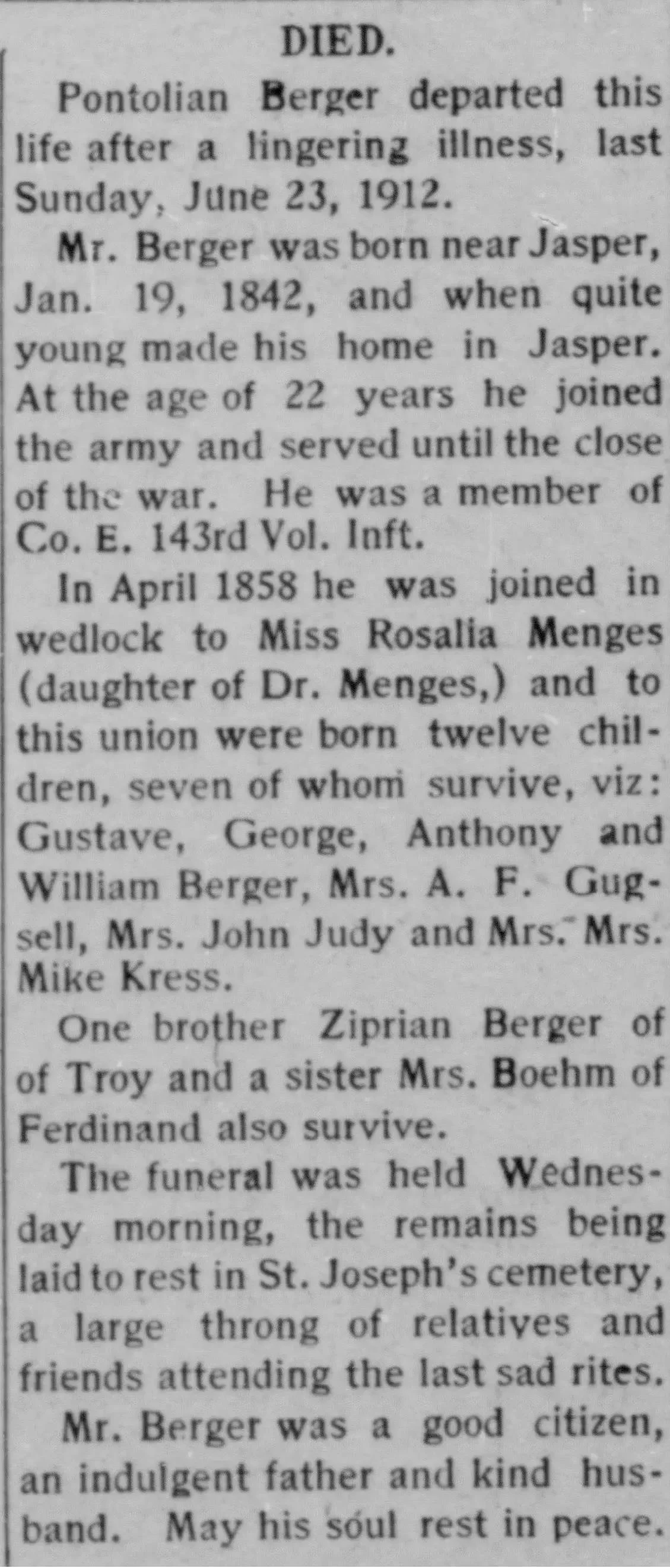
The Pontolian Berger obituary is a good example. It includes his birth near Jasper, his Civil War service, his wife Rosalia Menges, the names of surviving children, a brother and sister, and burial in St. Joseph’s Cemetery.
That is not just an obituary.
That is a family group, a military clue, a cemetery clue, and a list of next searches.
Checklist Section 2: Search Family Relationships, Not Just Names
When you search newspapers, do not stop with one person’s full name.
Search the people around them.
Newspapers often identify people by relationship:
daughter of
son of
wife of
widow of
husband of
mother of
brother of
sister of
cousin of
niece of
nephew of
attended by
guest of
Wedding announcements are especially useful for this.
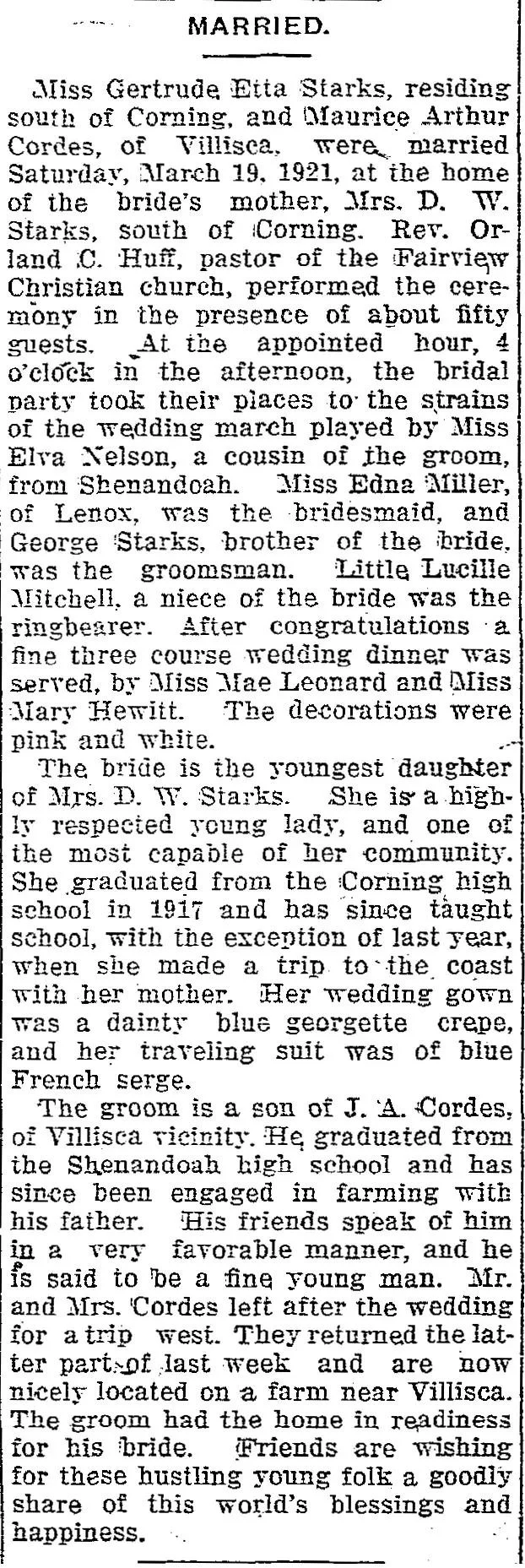
The wedding notice for Gertrude Etta Starks and Maurice Arthur Cordes gives far more than the couple’s names. It names the bride’s mother, Mrs. D. W. Starks, the minister, a cousin of the groom, the bridesmaid, the bride’s brother, a niece of the bride, the bride’s education, the groom’s father, and the couple’s future home near Villisca.
That is a lot of family context in one article.
Search for:
bride’s maiden name
groom’s name
parents’ names
siblings
attendants
minister
church
future residence
married daughters
in-laws
A wedding announcement can help you connect families that may not appear together in other records.
Checklist Section 3: Search Name Variations and OCR-Friendly Terms
Names are one of the biggest reasons newspaper searches fail.
Your ancestor may appear under:
full name
initials
nickname
maiden name
married name
spouse’s name
middle name
abbreviated first name
alternate spelling
misspelling
OCR mistake
A woman might appear as Gertrude Starks, Gertrude Cordes, Mrs. Maurice Cordes, or Mrs. M. A. Cordes.
A man might appear as Pontolian Berger, P. Berger, Mr. Berger, or even with a spelling variation.
Try searches like:
surname + town
surname + spouse
surname + cemetery
surname + occupation
initials + surname
married surname + maiden surname
alternate spelling + location
This is especially important because of OCR, the technology that makes scanned newspaper pages searchable. OCR is helpful, but it does not read every old newspaper page perfectly. If the print is faded, crooked, crowded, or damaged, the search may miss a name that is clearly visible to your eyes.
So make your searches flexible.
If a full-name search does not work, try fewer words.
Checklist Section 4: Search the Everyday Columns
This is where newspapers get fun.
Social columns, personals, and neighborhood notes often mention ordinary life in a way official records never do.
Look for columns with headings like:
personals
society
local news
neighborhood notes
community news
from our correspondents
town items
rural route news
church notes
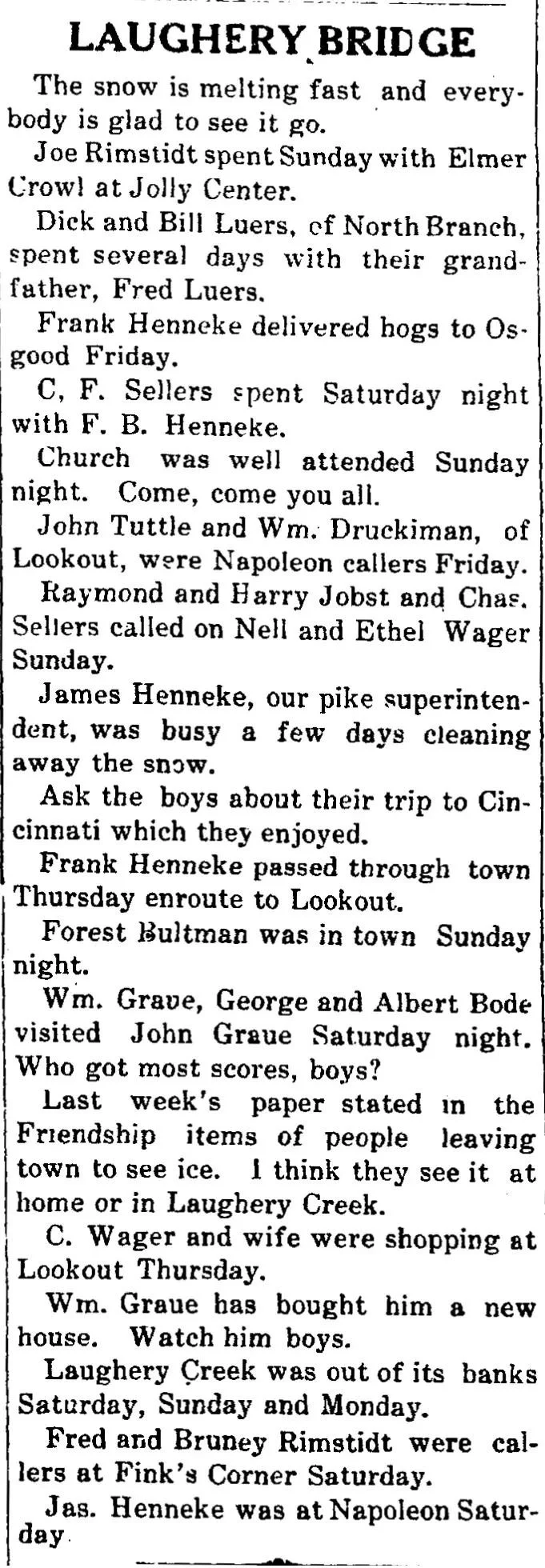
The Laughery Bridge column is a perfect example. It includes people visiting, shopping, calling on neighbors, passing through town, delivering hogs, attending church, buying a house, and dealing with local weather and creek conditions.
These may seem small, but for genealogy, they can be very useful.
They can show:
where someone was living
who they visited
who their neighbors were
which nearby towns mattered
who was related or socially connected
when someone moved
when someone was sick or away
what community they belonged to
Search for:
surname + visited
surname + called on
surname + Sunday
surname + guests
surname + returned home
surname + shopping
surname + church
surname + town name
Small-town newspapers are especially valuable for this kind of research because they often printed the everyday details larger papers skipped.
Checklist Section 5: Search by Place, Not Just Person
Sometimes the best search term is not a name.
It is a place.
Try searching:
town
township
county
neighborhood
street address
cemetery
church
school
employer
farm name
nearby town
county seat
If your ancestor lived outside a small town, the newspaper might describe the location rather than give an exact address.
Watch for wording like:
south of Corning
near Jasper
north of town
of Villisca
of North Branch
at the home of her mother
from the residence
near Fairland
When you find a place, search it again with the surname.
For example:
Berger + Jasper
Starks + Corning
Cordes + Villisca
Baldwin + Fairland
Wheatley + Dallasburg Baptist Church
Place searches can help you find articles that name searches miss.
Checklist Section 6: Check Legal, Probate, and Estate Notices
Legal notices may not look warm or personal, but they can be incredibly useful.
Search for:
probate
estate
will
executor
executrix
administrator
heirs
guardianship
court
land
property
sheriff sale
partition
summons
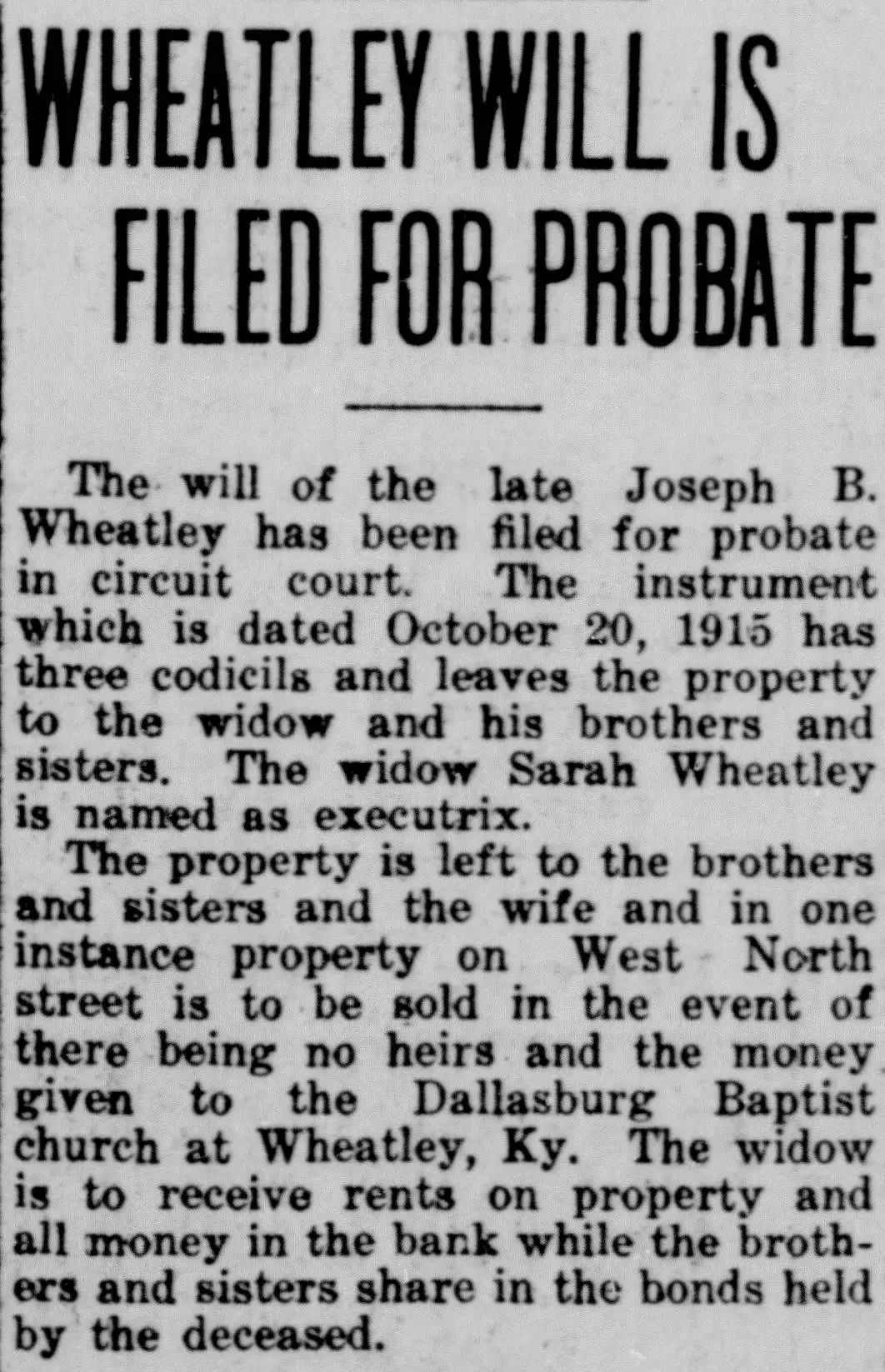
The Wheatley probate article is a strong example. It says the will of Joseph B. Wheatley was filed for probate. It names his widow, Sarah Wheatley, as executrix. It mentions property, brothers and sisters, bank money, bonds, a no-heirs condition, and the Dallasburg Baptist Church at Wheatley, Kentucky.
That gives a genealogist several next steps.
From one probate article, you might search:
Joseph B. Wheatley will
Sarah Wheatley executrix
Wheatley probate
Wheatley brothers sisters
Dallasburg Baptist Church
West North Street property
Legal and probate notices can help when family relationships are unclear or when a person’s estate created a paper trail.
Checklist Section 7: Look for Unexpected Life Events
Not every useful newspaper article is about birth, marriage, or death.
Sometimes the article that helps most is about something unexpected.
Search for:
accident
injury
illness
operation
hospital
fire
flood
crime
court
runaway
train accident
fall
broken arm
medical attention
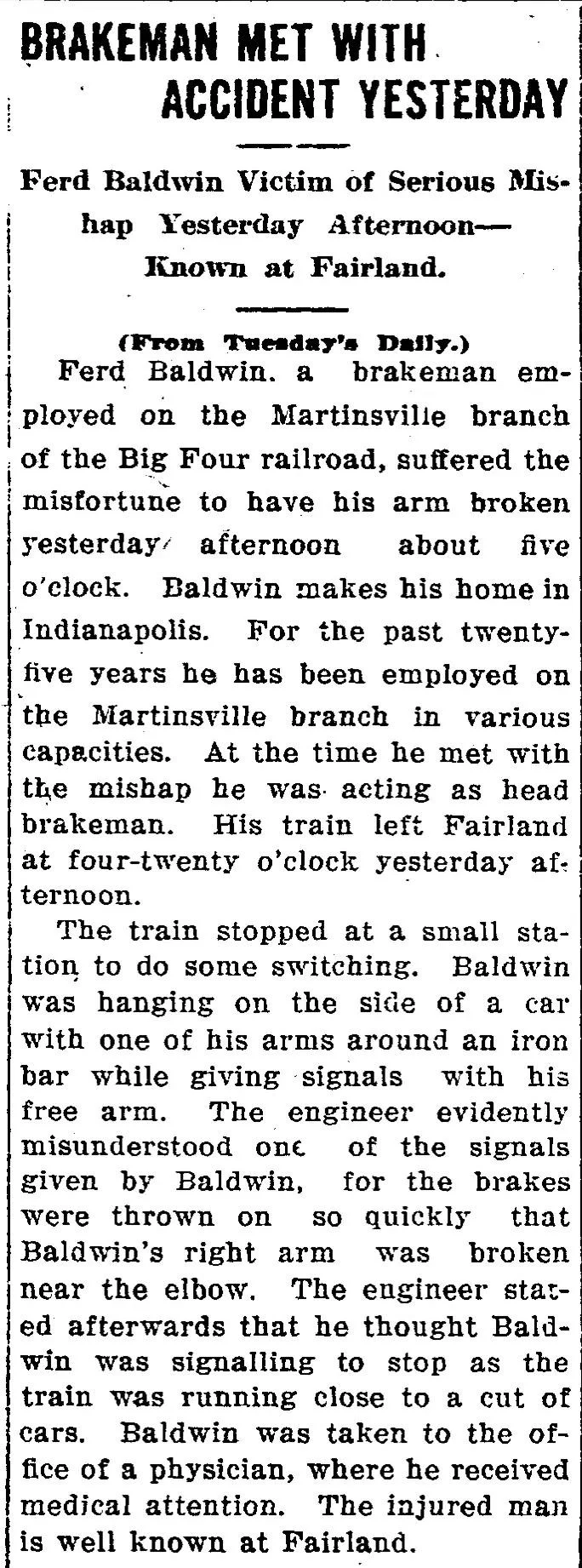
The Ferd Baldwin accident article is a good example. It tells us he was a brakeman, employed on the Martinsville branch of the Big Four railroad, made his home in Indianapolis, was known at Fairland, and was injured while working with a train.
That one accident report gives:
occupation
employer
work location
residence
event timeline
injury details
medical treatment
community connection
This kind of article can add a lot to a family story.
It can also explain a later move, job change, disability, court case, or obituary mention.
Checklist Section 8: Search Work, School, Church, and Community Roles
People often appear in newspapers because of what they did in the community.
Search for:
occupation
employer
business
farm
railroad
teacher
physician
merchant
minister
school
college
church
lodge
club
society
military unit
veterans group
These terms help you find more than basic facts.
They help you understand a person’s life.
For example, an obituary may mention military service. A wedding announcement may mention a teacher or farmer. An accident report may name an employer. A social column may point to a church or community group.
Those details are not extra.
They are search terms.
Try:
surname + occupation
surname + employer
surname + church
surname + school
surname + lodge
surname + regiment
surname + railroad
This is where newspapers can add context that formal records rarely include.
Checklist Section 9: Browse When Search Fails
Search is powerful, but it is not perfect.
If you know an event happened and the search results are weak, browse the paper.
Browse when:
the name is common
the name may be misspelled
the page is blurry
the OCR may be wrong
the article is very small
the notice may be in a local column
you know the date but not the exact headline
the town had only one or two likely newspapers
Check the days and weeks around an event.
For a death, browse:
the day after death
the week after death
the funeral date
one or two weeks later
For a wedding, browse:
the week of the wedding
the week after
nearby society columns
For probate, browse:
weeks or months after death
court notice sections
legal pages
Browsing takes longer, but it often finds what search misses.
Checklist Section 10: Log What You Tried, Including Failed Searches
This is not the most exciting part, but it will save you so much time.
Keep a simple research log.
Record:
ancestor searched
search terms used
date range searched
location searched
newspaper title
filters used
results found
searches that failed
spelling variations tried
why a result was rejected
what clue to try next
Failed searches matter.
If you already searched Gertrude Starks + Corning + marriage and found nothing, write that down. Then later you know to try Starks + Fairview Christian Church, Cordes + Villisca, or Mrs. D. W. Starks instead of repeating the same search.
A research log is not about being fancy.
It is about not doing the same work five times.
And I say that as someone who has absolutely done the same work five times.
Checklist Section 11: Save the Article and Cite It Correctly
A clipping is only useful if you can find it again.
When you save a newspaper article, record:
newspaper title
publication city and state
date
page number
column, if useful
article title or heading
person searched
URL or clipping link
archive name
notes on why the article matters
For genealogy, I would also add:
names mentioned
relationships stated
places mentioned
next searches suggested by the article
whether the information is proven or still needs verification
A screenshot without a source can become frustrating later.
You may know the article was important, but not remember where it came from or how to cite it.
Save the source details while you are there.
Future you will be grateful.
Copy/Paste Newspaper Research Checklist
Use this checklist when searching old newspapers for family history.
☐ Search the full name
☐ Search surname + town
☐ Search surname + county
☐ Search nearby towns and county seat
☐ Search maiden and married names
☐ Search initials and nicknames
☐ Search spelling variations
☐ Search spouse, children, parents, and siblings
☐ Search in-laws, cousins, and married daughters
☐ Search birth announcements
☐ Search marriage and wedding notices
☐ Search anniversary articles
☐ Search obituaries and death notices
☐ Search funeral and burial notices
☐ Search cemetery names
☐ Search church names and ministers
☐ Search school and college names
☐ Search occupations and employers
☐ Search social columns and personals
☐ Search legal, probate, and estate notices
☐ Search accident, illness, crime, and court reports
☐ Search military, draft, and veteran mentions
☐ Try fewer words if the full search fails
☐ Try broader date ranges
☐ Browse the newspaper when search does not work
☐ Record searches that failed
☐ Save clipping details and citation information
☐ Use every new clue for the next search
FAQs About Newspaper Research for Genealogists
What should genealogists look for in old newspapers?
Genealogists should look for obituaries, marriage notices, birth announcements, funeral notices, social columns, legal notices, probate items, accident reports, military mentions, church news, school items, advertisements, and local columns. Any article that names people, places, relationships, or events can become a genealogy clue.
Are newspapers only useful for obituaries?
No. Obituaries are helpful, but newspapers also include weddings, anniversaries, probate notices, social columns, accident reports, church news, school items, military lists, and everyday community mentions. Some of the best family history clues are not in obituary sections at all.
Why can’t I find my ancestor in a newspaper search?
Your ancestor may be listed under initials, a nickname, a married name, a misspelled name, a spouse’s name, or a relative’s name. OCR errors can also cause search problems. Try fewer words, spelling variations, nearby towns, relatives, and browsing.
Should I search relatives too?
Yes. Searching relatives is one of the best ways to find newspaper mentions. Try spouses, parents, children, siblings, in-laws, cousins, married daughters, and neighbors. Your ancestor may appear in an article about someone else.
How do I cite a newspaper clipping for genealogy?
At a minimum, record the newspaper title, publication place, date, page number, article title or heading, archive name, and URL or clipping link. Also, note the names and relationships mentioned so you remember why the clipping matters.
Final Thoughts
Newspaper research is not only about finding one perfect article.
It is about gathering clues.
A death notice may point to a cemetery.
A wedding announcement may name a mother.
A social column may place someone in a town.
A probate article may reveal a widow or church connection.
An accident report may explain an occupation, injury, or sudden move.
The more organized you are, the easier it is to see those clues.
A newspaper research checklist helps you slow down, search wider, and keep track of what you’ve already tried.
Pick one ancestor and run one new NewspaperArchive search from this checklist. Try a nearby town, a married name, a church, a cemetery, or a legal notice keyword. The best newspaper clue may not be in the first place you looked.
Key Takeaways
Newspapers are useful for much more than obituaries.
Search life events, social columns, legal notices, accidents, churches, schools, occupations, and relatives.
Use name variations, married names, initials, and nearby towns.
Browse newspapers when search does not work.
Log failed searches so you do not repeat the same work.
Save full citation details for every useful clipping.
Treat every newspaper article as a clue that can lead to the next search.