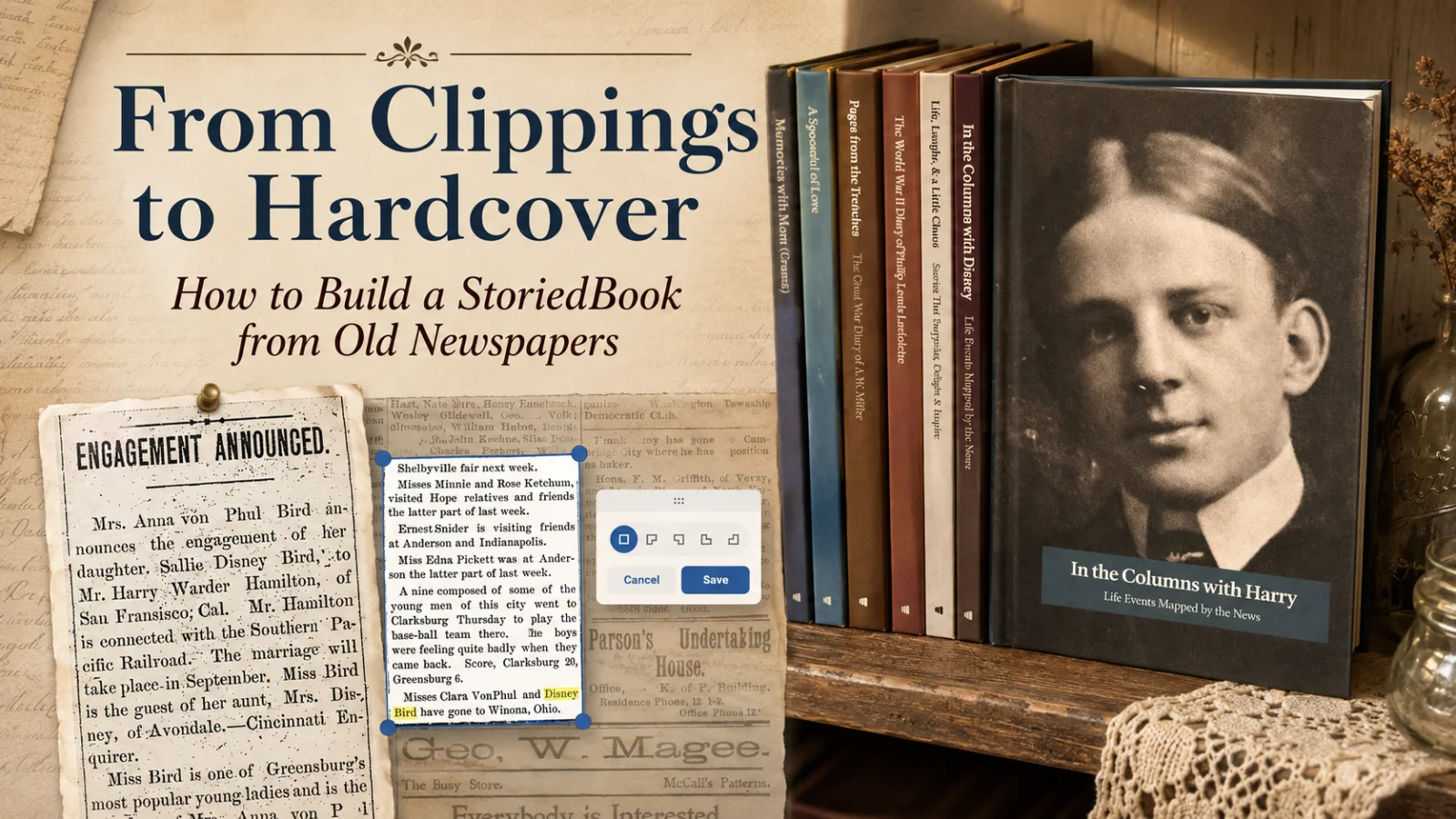
How to Turn Newspaper Clippings Into a Book: A Step-by-Step Guide
A step-by-step guide to searching, clipping, and tagging newspaper articles in Storied, then building them into a printed book family keepsake.
A StoriedBook is created in two stages. First, a NewspaperArchive subscription is used to search and clip newspaper articles directly inside Storied, a free companion platform, where each clipping is automatically transcribed and tagged with the people and places it mentions. Second, a separate StoriedBook Studio purchase provides 12 months of access to the tools needed to arrange those clipping stories chronologically into a customized, printed hardcover book, complete with an auto-generated People Index and Place Index based on the tags applied during clipping.
If you've spent any real time searching old newspapers, you already know how this goes. You find one clipping, then another, then suddenly you have a folder full of screenshots and no real plan for what to do with them. They're useful in theory, but they're not exactly something you can hand your dad or your kids and say "Here, read this."
There's a way to turn that folder into something real: a printed, customized family history book built from the actual clippings you've found, called a StoriedBook. I've built two of them from newspaper clippings on my own great-grandparents, and once you know the order to do things in, the process is a lot more straightforward than it looks from the outside.
This is the step-by-step version of exactly how. If you'd rather see the finished product first, the case study walks through the two books I built and everything the clippings revealed. Otherwise, here's how to build one of your own, from your first search to the printed book on your shelf.
Quick Answer
A StoriedBook is built by searching and clipping newspaper articles directly inside Storied, which comes free with a NewspaperArchive subscription, tagging the people and places in each clipping as you go, and then purchasing 12 months of StoriedBook Studio access to arrange those clipping stories into a customized, ordered hardcover book. The process auto-generates a People Index and a Place Index in the back of the finished book.
Search a name you already have in NewspaperArchive and see how many clippings turn up before you even think about the book.
What You'll Need
A NewspaperArchive subscription, which gives you the newspaper search itself.
Storied, which is free with that same subscription and uses the same login. This is where you clip and build your stories.
StoriedBook Studio, purchased inside Storied itself, a separate purchase that gives you 12 months of access to the book-building tools, which is what actually turns your saved clipping stories into a printed book. You can buy Studio access without a NewspaperArchive subscription, but without NewspaperArchive you won't be able to search or clip newspapers inside it, so the two are meant to work together for this kind of project.
Step 1: Search and Clip Your Newspaper Articles
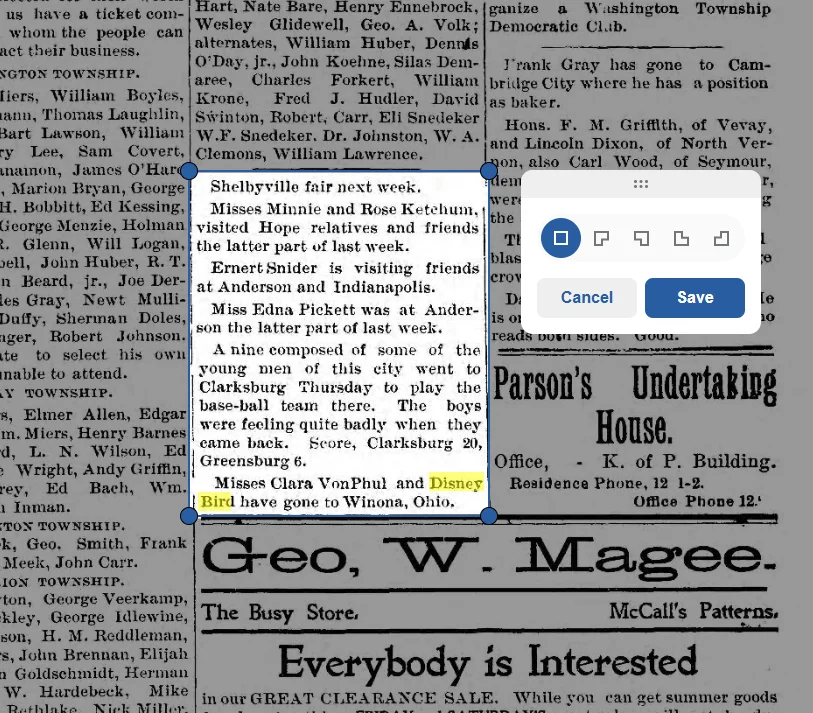
The NewspaperArchive collection is built directly into Storied, so you search and clip in the same place. Draw a selection box around the article you want, and if you searched for a specific name, Storied highlights it right there in the clip, which makes it easy to confirm you've got the right article before you save it.
Step 2: Tag People, Even Ones You Don't Recognize Yet
As you clip, tag every person named in the article, not just your direct ancestor. You can pull names from a family tree you've already built in Storied, or add someone new on the fly if they're not in your tree at all. Tagging unrelated people is genuinely useful here. It's how a research network like the one I found around Disney starts to take shape, and it comes with a second payoff: every person you tag gets pulled into an auto-generated People Index in the back of the finished book, along with a Place Index built from the locations tagged in your stories.
Step 3: Let Storied Do the Transcribing
Once you clip an article, Storied gives the clipping story a title, pulls the date and location of the newspaper, and transcribes the text automatically. You can leave it as is or edit anything that needs a correction, which is worth doing for older, harder-to-read print.
Step 4: Save, and Repeat
Click Done to save the clipping story. From there you can share it with a link, or to Facebook, Pinterest, or X, if you want to, though sharing is entirely optional. Repeat this for every clipping you want in the book.
One thing worth remembering here: don't skip an article just because it's only a line or two. Putting all of the small things together is what actually builds the life and story of the person. A single line about a slumber party or a trip to visit friends adds up in ways a full article rarely does on its own.
Step 5: Get Access to StoriedBook Studio
You purchase StoriedBook Studio from inside Storied itself, right alongside your clipping stories. Your first StoriedBook is covered by a $99 payment, which includes 12 months of access to StoriedBook Studio's book-building tools and one printed hardcover book, full cover, up to 200 pages. If your book runs longer, additional pages beyond 200 are 30 cents each, up to a maximum of 450 pages.
If you want to build a second, separate book, like a companion project for a different family member, that additional project is $79.99 rather than another full $99. That's different from ordering more printed copies of the same finished book, which is $49.99 per copy.
Step 6: Start Your Book
When you create a new book, you'll see a few starting templates, including Memorial, Recipe, and Life Story options. For a newspaper clipping project, Start From Scratch is the right choice, since it gives you a blank structure built for exactly this kind of content.
Step 7: Customize Your Cover
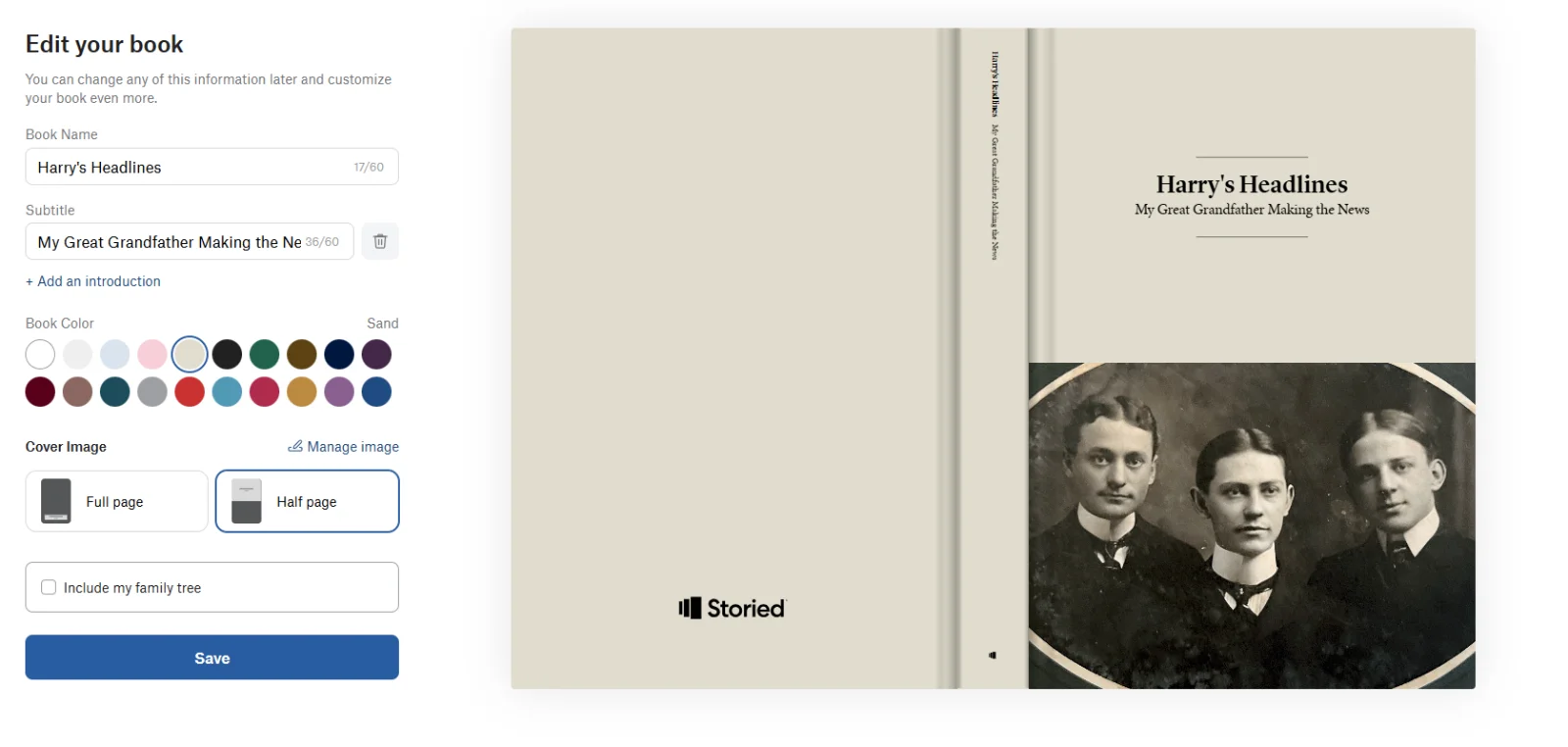
Give your book a name and subtitle, and add an introduction if you want one. Choose from twenty book colors, and decide whether your cover image should run full page or half page, or skip an image entirely. You can also choose whether to include your family tree in the book.
Step 8: Add and Arrange Your Clipping Stories
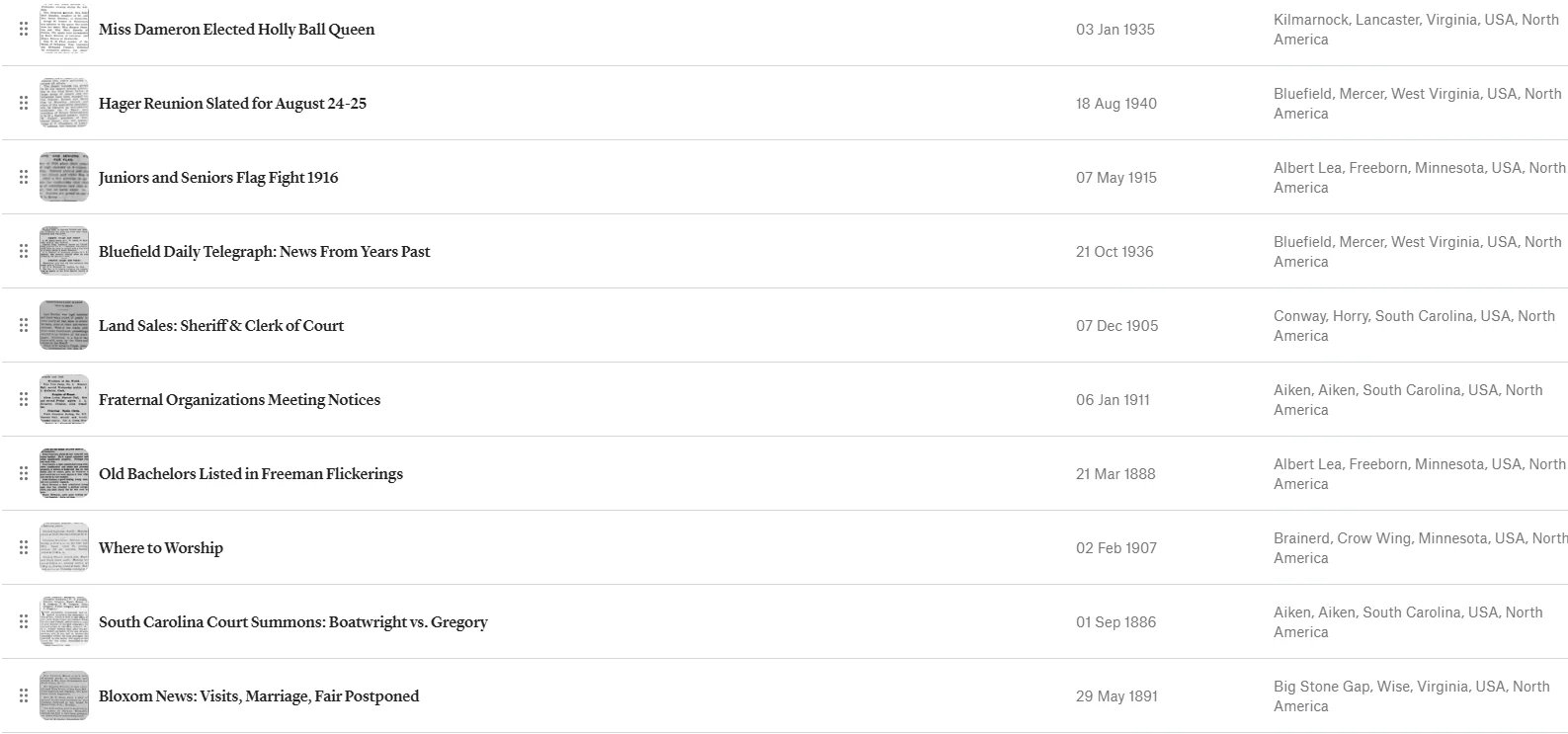
Add the clipping stories you saved earlier, then drag them into whatever order you want. For a project like this, chronological order tends to work best, so the book reads like a timeline rather than a scattered collection.
Step 9: Preview Carefully, Then Order
Before you send anything to print, go through the full book preview. This is the one step worth slowing down for. Catching a transcription error or a misordered page here is a lot easier than catching it after a printed hardcover book has already arrived.
What Small-Town Newspapers Tend to Hand You
The clippings that make a StoriedBook feel alive are rarely the big ones. They're the school honors, the parties, the job changes, the one line about a trip to visit friends in the next town over. Small-town papers ran that kind of detail constantly, because in a town small enough, it counted as news. That's exactly the material worth searching for and clipping first.
Frequently Asked Questions
Do I need NewspaperArchive and StoriedBook Studio separately?
Yes. A NewspaperArchive subscription is what lets you search and clip newspapers inside Storied, which is free. StoriedBook Studio is purchased inside Storied itself, as a separate purchase that gives you 12 months of access to the tools that build and print the actual book.
How many pages can a StoriedBook have?
The base price includes up to 200 pages. Beyond that, additional pages are 30 cents each, up to a maximum of 450 pages total.
What does it cost to make more than one StoriedBook?
Your first StoriedBook is included in the $99 StoriedBook Studio purchase. A second, separate book project is $79.99. Ordering additional printed copies of the same book, rather than a new book, is $49.99 per copy.
Can I tag people who aren't directly related to my ancestor?
Yes, and it's worth doing. Tagging anyone named in a clipping helps build out your research network and adds them to the finished book's People Index.
What if a clipping is only a sentence long?
Include it anyway. Small mentions add up to a fuller picture of who someone was, even when no single one of them seems significant on its own.
Can I share a clipping before my book is finished?
Yes, sharing is optional and available each time you save a clipping story, whether by link or to Facebook, Pinterest, or X.
Key Takeaways
Building a StoriedBook comes down to two separate stages: searching and clipping inside Storied, which is free with your NewspaperArchive subscription, and then arranging those clippings into a printed book with StoriedBook Studio. Tag generously, keep the small mentions, and give the final preview a careful look before you order.
If you want to see what all of this looks like in a finished, real example, the case study walks through the two books built from these exact steps and what the clippings ended up revealing.
Once you've got a handful of clipping stories tagged and saved, building the book itself is the easy part.